
Webhooks
Use incoming webhooks to get real-time updates.
ArcSite uses webhooks to notify your application when an event happens in your organization. Webhooks are particularly useful for asynchronous events like new drawing created.
A webhook enables ArcSite to push real-time notifications to your app. ArcSite uses HTTPS to send these notifications to your app as a JSON payload. You can then use these notifications to execute actions in your backend systems.
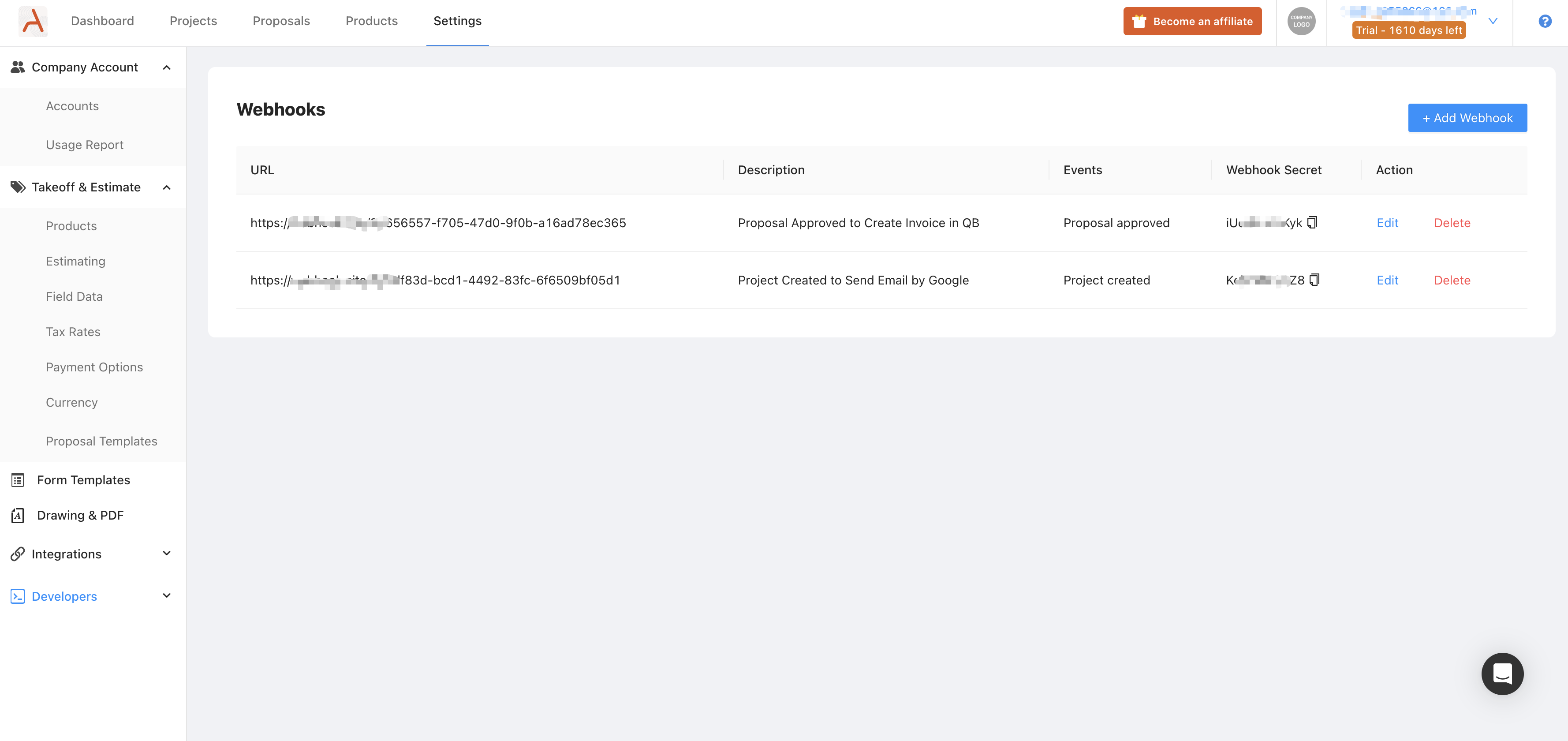
You can create and manage your webhooks from the ArcSite web UI.
A of webhook payload contains both event type and payload data.
{ "event": "project.created", "data": { "id": 36029621652695040, "name": "project 4", "created_at": "2022-01-16T04:19:23", "updated_at": "2022-01-16T04:19:23", "job_number": "144111", "customer": { "name": "Jack", "phone": "1441", "second_phone": "1122" } }}Events
Section titled “Events”| Event | Description |
|---|---|
project.created | Triggered when a project is created. |
project.updated | Triggered when a project’s own data is modified, such as renaming, descriptions, or tags. |
drawing.created | Triggered when a drawing is created by uploading PDF files or uploading a new drawing. |
drawing.updated | Triggered when a drawing is manually re-uploaded to the cloud after its initial creation. |
proposal.signed | Triggered when a proposal is signed in the app. (Deprecated) |
proposal.sent | Triggered when a proposal is sent to customer. (Deprecated) |
proposal.approved | Triggered when a proposal is approved by customer. (Deprecated) |
proposal.status_changed | Triggered when a proposal status changes. |
proposal.payment.received | Triggered when a payment is successfully received for a proposal. |
Built-in retries
Section titled “Built-in retries”ArcSite webhooks have built-in retry methods for 3xx, 4xx, or 5xx response status codes. If ArcSite doesn’t quickly receive a 2xx response status code for an event, webhooks will retry the event until it receives a 2xx response or up to certain times.
Secure your endpoint
Section titled “Secure your endpoint”We highly recommend you secure your integration by ensuring your handler verifies that all webhook request are generated by ArcSite.
The following section describes how to verify webhook signatures:
- Retrieve your endpoint’s secret.
- Verify the signature.
Retrieving your endpoint’s secret
Use the ArcSite Webhooks web UI to get the webhook secret. ArcSite generates a unique secret key for each webhook.
{ "ArcSite-Signature": "t=1716975491,v=5f43f28c3d33c34b18634399a8e3bb69dcfb9f146cea562289306d783187d0f1"}Verifying the signature
To verify the signature, you need to compare the signature in the header of the incoming webhook request with the signature using the secret and the request body.
The ArcSite-Signature header included in each signed event contains a timestamp and signature that you must verify. The timestamp is prefixed by t=, and the signature is prefixed by a v=.
import hmacimport hashlibfrom django.http import HttpResponsefrom django.views.decorators.csrf import csrf_exempt

SECRET = 'your_webhook_secret'

def verify_webhook(header, payload, secret):    # Extract timestamp and signature    elements = dict(item.split('=') for item in header.split(','))    timestamp, signature = elements['t'], elements['v']    # Prepare signed payload string    signed_payload = f"{timestamp}.{payload}"    # Compute expected signature    expected_signature = hmac.new(secret.encode(), signed_payload.encode(), hashlib.sha256).hexdigest()    # Verify signature    return hmac.compare_digest(signature, expected_signature)

# Django Example@csrf_exemptdef webhook_handler(request):    if request.method == 'POST':        header = request.headers.get('ArcSite-Signature')        payload = request.body.decode('utf-8')        if not verify_webhook(header, payload, SECRET):            return HttpResponse('Invalid signature or timestamp.', status=400)        # TODO Process the valid webhook payload here        return HttpResponse('Webhook received successfully.', status=200)    return HttpResponse('Method not allowed.', status=405)
Step 1: Extract the timestamp and signature from the header
Split the header using the , character as the separator to get a list of elements. Then split each element using the = character as the separator to get a prefix and value pair.
The value for the prefix t corresponds to the timestamp and the prefix v to the signature. You can discard all other elements.
Step 2: Prepare the signed_payload string
The signed_payload string is created by concatenating:
- The timestamp (as a string)
- The character
. - The actual JSON payload (that is, the request body)
Step 3: Determine the expected signature
Compute an HMAC with the SHA256 hash function. Use the webhook’s secret as the key, and use the signed_payload string as the message.
Step 4: Compare the signature
Compare the signature in the header to the expected signature.
const express = require("express");const crypto = require("crypto");
const app = express();const SECRET = "your_webhook_secret";
app.use(express.raw({ type: "*/*" }));
function verifyWebhook(header, payload, secret) {  // Extract timestamp and signature  const elements = header.split(",").reduce((acc, element) => {    const [key, value] = element.split("=");    acc[key] = value;    return acc;  }, {});  const signature = elements["v"];  // Prepare signed payload string  const signedPayload = `${elements["t"]}.${payload}`;  // Compute expected signature  const expectedSignature = crypto    .createHmac("sha256", secret)    .update(signedPayload)    .digest("hex");  // Verify signature  return crypto.timingSafeEqual(    Buffer.from(signature),    Buffer.from(expectedSignature),  );}
app.post("/webhook", (req, res) => {  const header = req.headers["arcsite-signature"];  const payload = req.body.toString("utf-8");  if (!verifyWebhook(header, payload, SECRET)) {    return res.status(400).send("Invalid signature.");  }  // TODO Process the valid webhook payload here  res.status(200).send("Webhook received successfully.");});
app.listen(3000, () => {  console.log(`Server is running on port 3000`);});
Project Created
Section titled “Project Created”project.created Triggered when a project is created.
Project Created Webhook Payload
Section titled “Project Created Webhook Payload”| Parameter | Type | Description |
|---|---|---|
| id | String | ID of the project |
| name | String | Name of the project |
| customer | Customer[Optional] | Customer profile of the project |
| job_number | String[Optional] | Job number of the project |
| work_site_address | Address[Optional] | Worksite address of the project |
| sales_rep | SalesRep[Optional] | Sales Representative of the project |
| tags | List[String] | Tags attached to the project |
Project Updated
Section titled “Project Updated”project.updated Triggered when a project’s own data is modified, including:
- Renaming the project, or updating its description / display name / client profile.
- Adding or removing a tag on the project, or removing a tag definition that was attached to the project.
Project Updated Webhook Payload
Section titled “Project Updated Webhook Payload”The payload schema is identical to project.created.
| Parameter | Type | Description |
|---|---|---|
| id | String | ID of the project |
| name | String | Name of the project |
| customer | Customer[Optional] | Customer profile of the project |
| job_number | String[Optional] | Job number of the project |
| work_site_address | Address[Optional] | Worksite address of the project |
| sales_rep | SalesRep[Optional] | Sales Representative of the project |
| tags | List[String] | Tags attached to the project |
Drawing Created
Section titled “Drawing Created”The drawing.created webhook will be triggered when a drawing is created by uploading PDF files on the user site or manually uploading some newly created drawing to the cloud from the ArcSite App.
Drawing Created Webhook Payload
Section titled “Drawing Created Webhook Payload”| Parameter | Type | Description |
|---|---|---|
| id | String | ID of the drawing |
| project_id | String | Project ID of the drawing |
| name | String | Name of the drawing |
| pdf_url | String | Download address of PDF format of the drawing |
| png_url | String | Download address of PNG format of the drawing |
| tags | List[String] | Tags added to this drawing |
Drawing Updated
Section titled “Drawing Updated”The drawing.updated webhook is triggered whenever a drawing is manually re-uploaded to the cloud from the ArcSite App after its initial creation.
Drawing Updated Webhook Payload
Section titled “Drawing Updated Webhook Payload”| Parameter | Type | Description |
|---|---|---|
| id | String | ID of the drawing |
| project_id | String | Project ID of the drawing |
| name | String | Name of the drawing |
| pdf_url | String | Download address of PDF format of the drawing |
| png_url | String | Download address of PNG format of the drawing |
| tags | List[String] | Tags added to this drawing |
Proposal PDF Signed(Deprecated)
Section titled “Proposal PDF Signed(Deprecated)”proposal.signed Triggered when a proposal is signed in the app.
Proposal PDF signed Webhook Payload
Section titled “Proposal PDF signed Webhook Payload”| Parameter | Type | Description |
|---|---|---|
| project_id | String | Project ID of the drawing |
| name | String | File name of the signed document |
| url | String | Download address of the signed pdf |
| drawing_id | String | The associated drawing id of the signed pdf |
| drawing_version_id | String | The associated drawing version id of the signed pdf |
Proposal Sent(Deprecated)
Section titled “Proposal Sent(Deprecated)”proposal.sent Triggered when a proposal is sent to customer.
Proposal Sent Webhook Payload
Section titled “Proposal Sent Webhook Payload”| Parameter | Type | Description |
|---|---|---|
| project_id | id | Approved proposal related project ID |
| proposal_id | id | Proposal ID |
| name | String | Proposal name |
| customer_name | String | Proposal customer name |
| contact_email | String | The sales email |
| sales_representative | String | The sales name |
| proposal_options | List[ProposalOption] | The proposal option data list |
ProposalOption
Section titled “ProposalOption”| Parameter | Type | Description |
|---|---|---|
| name | String | Proposal option name |
| drawing_id | String | The proposal option associated drawing ID |
| drawing_version_id | String | The proposal option associated drawing version ID |
| total | Number | The total of the proposal option |
| pdf_url | String | Download address of the proposal option pdf file |
Proposal Approved(Deprecated)
Section titled “Proposal Approved(Deprecated)”proposal.approved Triggered when a proposal is approved by customer.
Proposal Approved Webhook Payload
Section titled “Proposal Approved Webhook Payload”| Parameter | Type | Description |
|---|---|---|
| project_id | id | Approved proposal related project ID |
| proposal_id | id | Proposal ID |
| name | String | Proposal name |
| customer_name | String | Proposal customer name |
| contact_email | String | The sales email |
| sales_representative | String | The sales name |
| approved_option | ProposalOption | Approved proposal option data |
Proposal Status Changed
Section titled “Proposal Status Changed”proposal.status_changed Triggered when a proposal status changes.
Proposal Status Change Webhook Payload
Section titled “Proposal Status Change Webhook Payload”| Parameter | Type | Description |
|---|---|---|
| proposal_id | id | Proposal ID |
| project_id | id | Proposal related project ID |
| name | String | Proposal name |
| status | String | Proposal status (DRAFT/PENDING/VOID/LOST/APPROVED) |
| sales_representative | String | The sales name |
| contact_email | String | The sales email |
| customer_name | String | Proposal customer name |
| customer_email | String | Proposal customer email |
| document_number | String | (optional) Proposal document number |
| close_note | String | (optional)Note explaining why proposal was closed (Only present when status is VOID or LOST) |
| total | Number | (optional)The total of the proposal (Only present when status is APPROVED) |
| pdf_url | String | (optional) Download link to the proposal PDF file. Only present when status is APPROVED. Contains the signed version if the proposal has been signed |
| approved_option | Object | (optional) Contains drawing_id (String) field and id (String) field only for online approvals. Only present when status is APPROVED |
| initial_proposal_id | String | (optional) ID of the initial proposal. Only present for change order proposals. |
| proposal_options | List[ProposalOption] | (optional) Full list of proposal options for online proposals. Included whenever proposal status changes. |
| template_id | String? | The ID of the template used to create the proposal. Returns null when the proposal is signed in app. |
Proposal Payment Received
Section titled “Proposal Payment Received”proposal.payment.received Triggered when a payment is successfully received for a proposal.
This webhook fires for both ArcSite Payment and Mark as Paid (manual payment recording). The webhook is triggered once per payment transaction.
{ "event": "proposal.payment.received", "data": { "proposal_id": "12345", "paid_amount": 5000.0, "pay_channel": "arcsite_payment", "paid_time": "2025-11-06T10:30:00+00:00", "drawing_id": "22444", "payment_method": "Credit Card" }}{ "event": "proposal.payment.received", "data": { "proposal_id": "12345", "paid_amount": 2500.0, "pay_channel": "mark_as_paid", "paid_date": "2025-11-06", "drawing_id": "22444", "payment_method": "Check" }}Proposal Payment Received Webhook Payload
Section titled “Proposal Payment Received Webhook Payload”| Parameter | Type | Description |
|---|---|---|
| proposal_id | String | ID of the proposal that received the payment |
| drawing_id | String | The approved drawing id of the proposal |
| paid_amount | Number | Amount of this specific payment (not cumulative). Decimal with 2 decimal places |
| pay_channel | String | Payment channel identifier: arcsite_payment (online payment) or mark_as_paid (manual recording) |
| paid_time | String | (conditional) Timestamp when payment was received. Only present when pay_channel is arcsite_payment. ISO 8601 |
| paid_date | String | (conditional) Date when payment was recorded. Only present when pay_channel is mark_as_paid. ISO 8601 date |
| payment_method | String | Payment method. Examples: Credit Card, ACH, Check, Cash |